
Bu bölümde, proje için bir HUD Widget ve bir Pause Menu Widget olmak üzere iki adet Widget oluşturacağız.
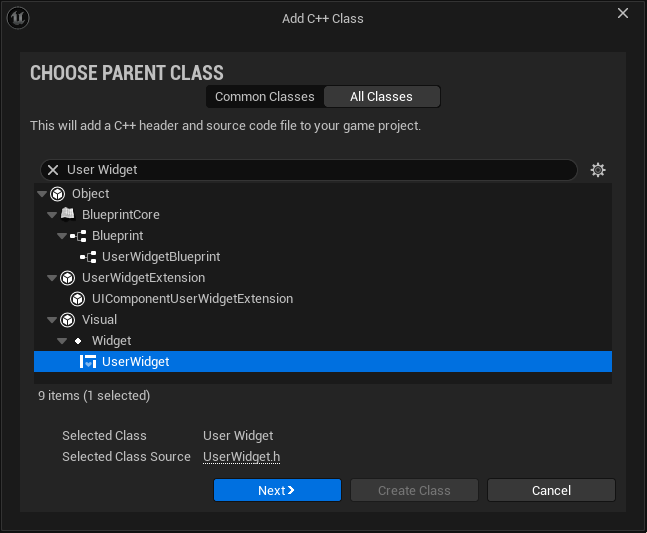
1. Unreal Engine Editor'da, ana menüden "Tools - New C++ Class" seçeneği ile açılan "Add C++ Class" penceresinde "UserWidget" seçeneği seçili iken, "Next" butonuna tıklayalım.
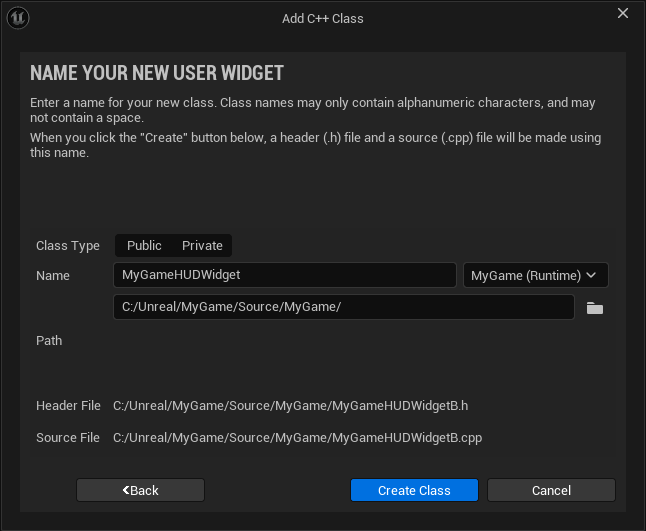
2. Açılan pencerede "Name" satırına "MyGameHUDWidget" değerini girdikten sonra "Create Class" butonuna tıklayarak Widget sınıfını oluşturalım.
3. Dosyaların içerikleri aşağıdaki şekilde olacaktır:
// MyGameHUDWidget.h

#include "CoreMinimal.h"
#include "Blueprint/UserWidget.h"
#include "MyGameHUDWidget.generated.h"

/**
 *
 */
UCLASS()
class MYGAME_API UMyGameHUDWidget : public UUserWidget
{
	GENERATED_BODY()
};
// MyGameHUDWidget.cpp

#include "MyGameHUDWidget.h"
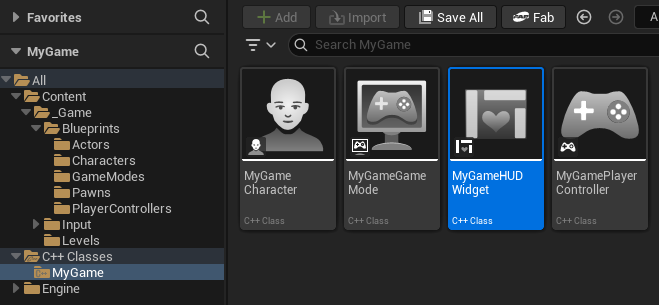
4. Kodlar derlendikten sonra "C++ Classes/MyGame" dizini altında "MyGameHUDWidget" adlı bir dosya otomatik olarak oluşturulacaktır.
Widget sınıfı kod dosyalarının içeriğini aşağıdaki şekilde düzenleyelim:
// MyGameHUDWidget.h

#pragma once

#include "CoreMinimal.h"
#include "Blueprint/UserWidget.h"
#include "MyGameHUDWidget.generated.h"

/**
 * Game HUD Widget - C++ implementasyonu
 */
UCLASS()
class MYGAME_API UMyGameHUDWidget : public UUserWidget
{
    GENERATED_BODY()

public:
    //////////////////////////////////////////////////////////////////////////
    // Constructor ve Yaşam Döngüsü

    /**
     * Constructor
     */
    UMyGameHUDWidget(const FObjectInitializer& ObjectInitializer);

    /**
     * Native Construct - Widget oluşturulduğunda çağrılır
     */
    virtual void NativeConstruct() override;

    /**
     * Native Destruct - Widget yok edilirken çağrılır
     */
    virtual void NativeDestruct() override;

    //////////////////////////////////////////////////////////////////////////
    // Widget Update Fonksiyonları

    /**
     * Skoru güncelle
     * @param NewScore - Yeni skor değeri
     */
    UFUNCTION(BlueprintCallable, Category = "MyGame|HUD")
    void UpdateScore(float NewScore);

    /**
     * Sağlığı güncelle
     * @param HealthPercentage - Sağlık yüzdesi (0-1)
     */
    UFUNCTION(BlueprintCallable, Category = "MyGame|HUD")
    void UpdateHealth(float HealthPercentage);

    /**
     * Zamanı güncelle
     * @param RemainingTime - Kalan süre (saniye)
     */
    UFUNCTION(BlueprintCallable, Category = "MyGame|HUD")
    void UpdateTime(float RemainingTime);

    /**
     * Mesaj göster
     * @param Message - Gösterilecek mesaj
     * @param DisplayTime - Görüntülenme süresi
     */
    UFUNCTION(BlueprintCallable, Category = "MyGame|HUD")
    void ShowMessage(const FString& Message, float DisplayTime = 3.0f);

    //////////////////////////////////////////////////////////////////////////
    // Blueprint Callable Events (C++'dan tetiklenecek)

    /**
     * Widget başlatıldığında
     */
    UFUNCTION(BlueprintImplementableEvent, Category = "MyGame|HUD")
    void OnWidgetInitialized();

    /**
     * Skor güncellendiğinde
     */
    UFUNCTION(BlueprintImplementableEvent, Category = "MyGame|HUD")
    void OnScoreUpdated(float NewScore);

    /**
     * Sağlık güncellendiğinde
     */
    UFUNCTION(BlueprintImplementableEvent, Category = "MyGame|HUD")
    void OnHealthUpdated(float HealthPercentage);

    /**
     * Zaman güncellendiğinde
     */
    UFUNCTION(BlueprintImplementableEvent, Category = "MyGame|HUD")
    void OnTimeUpdated(float RemainingTime);

protected:
    //////////////////////////////////////////////////////////////////////////
    // Widget Component Referansları

    /**
     * Skor Text Block
     */
    UPROPERTY(meta = (BindWidget))
    class UTextBlock* TextScore = nullptr;

    /**
     * Sağlık Progress Bar
     */
    UPROPERTY(meta = (BindWidget))
    class UProgressBar* ProgressBarHealth = nullptr;

    /**
     * Zaman Text Block
     */
    UPROPERTY(meta = (BindWidget))
    class UTextBlock* TextTime = nullptr;

    /**
     * Mesaj Text Block
     */
    UPROPERTY(meta = (BindWidget))
    class UTextBlock* TextMessage = nullptr;

    /**
     * Mesaj görüntülenme süresi
     */
    FTimerHandle MessageTimerHandle;

private:
    //////////////////////////////////////////////////////////////////////////
    // İç Değişkenler

    /**
     * Mevcut skor
     */
    float CurrentScore = 0.0f;

    /**
     * Mevcut sağlık yüzdesi
     */
    float CurrentHealthPercentage = 1.0f;

    /**
     * Mevcut kalan süre
     */
    float CurrentRemainingTime = 0.0f;

    //////////////////////////////////////////////////////////////////////////
    // Yardımcı Fonksiyonlar

    /**
     * Mesajı temizle
     */
    void ClearMessage();

    /**
     * Formatlı zaman string'i oluştur
     */
    FString FormatTime(float Seconds) const;
};
// MyGameHUDWidget.cpp

#include "MyGameHUDWidget.h"
#include "Components/TextBlock.h"
#include "Components/ProgressBar.h"
#include "TimerManager.h"
#include "Engine/World.h"
#include "Internationalization/Text.h"

// Log category
DEFINE_LOG_CATEGORY_STATIC(LogMyGameHUD, Log, All);

UMyGameHUDWidget::UMyGameHUDWidget(const FObjectInitializer& ObjectInitializer)
    : Super(ObjectInitializer)
{
    UE_LOG(LogMyGameHUD, Log, TEXT("MyGameHUDWidget constructor"));
}

void UMyGameHUDWidget::NativeConstruct()
{
    Super::NativeConstruct();

    UE_LOG(LogMyGameHUD, Log, TEXT("HUD Widget NativeConstruct"));

    // Widget component'lerini kontrol et
    if (!TextScore)
    {
        UE_LOG(LogMyGameHUD, Warning, TEXT("TextScore is not bound!"));
    }

    if (!ProgressBarHealth)
    {
        UE_LOG(LogMyGameHUD, Warning, TEXT("ProgressBarHealth is not bound!"));
    }

    if (!TextTime)
    {
        UE_LOG(LogMyGameHUD, Warning, TEXT("TextTime is not bound!"));
    }

    if (!TextMessage)
    {
        UE_LOG(LogMyGameHUD, Warning, TEXT("TextMessage is not bound!"));
    }

    // Başlangıç değerlerini ayarla
    UpdateScore(0.0f);
    UpdateHealth(1.0f);
    UpdateTime(0.0f);

    // Mesajı temizle
    if (TextMessage)
    {
        TextMessage->SetVisibility(ESlateVisibility::Collapsed);
    }

    // Blueprint event'ini tetikle
    OnWidgetInitialized();
}

void UMyGameHUDWidget::NativeDestruct()
{
    UE_LOG(LogMyGameHUD, Log, TEXT("HUD Widget NativeDestruct"));

    // Timer'ları temizle
    if (UWorld* World = GetWorld())
    {
        World->GetTimerManager().ClearTimer(MessageTimerHandle);
    }

    Super::NativeDestruct();
}

void UMyGameHUDWidget::UpdateScore(float NewScore)
{
    CurrentScore = NewScore;

    if (TextScore)
    {
        FText ScoreText = FText::FromString(FString::Printf(TEXT("Score: %.0f"), CurrentScore));
        TextScore->SetText(ScoreText);
        UE_LOG(LogMyGameHUD, Verbose, TEXT("Score updated: %.0f"), CurrentScore);
    }

    // Blueprint event
    OnScoreUpdated(CurrentScore);
}

void UMyGameHUDWidget::UpdateHealth(float HealthPercentage)
{
    CurrentHealthPercentage = FMath::Clamp(HealthPercentage, 0.0f, 1.0f);

    if (ProgressBarHealth)
    {
        ProgressBarHealth->SetPercent(CurrentHealthPercentage);

        // Sağlığa göre renk değiştir
        FLinearColor HealthColor;
        if (CurrentHealthPercentage > 0.6f)
        {
            HealthColor = FLinearColor::Green;
        }
        else if (CurrentHealthPercentage > 0.3f)
        {
            HealthColor = FLinearColor::Yellow;
        }
        else
        {
            HealthColor = FLinearColor::Red;
        }

        ProgressBarHealth->SetFillColorAndOpacity(HealthColor);

        UE_LOG(LogMyGameHUD, Verbose, TEXT("Health updated: %.1f%%"), CurrentHealthPercentage * 100.0f);
    }

    // Blueprint event
    OnHealthUpdated(CurrentHealthPercentage);
}

void UMyGameHUDWidget::UpdateTime(float RemainingTime)
{
    CurrentRemainingTime = FMath::Max(0.0f, RemainingTime);

    if (TextTime)
    {
        FString TimeString = FormatTime(CurrentRemainingTime);
        FText TimeText = FText::FromString(FString::Printf(TEXT("Time: %s"), *TimeString));
        TextTime->SetText(TimeText);

        UE_LOG(LogMyGameHUD, Verbose, TEXT("Time updated: %.0f seconds"), CurrentRemainingTime);
    }

    // Blueprint event
    OnTimeUpdated(CurrentRemainingTime);
}

void UMyGameHUDWidget::ShowMessage(const FString& Message, float DisplayTime)
{
    if (!TextMessage)
        return;

    UE_LOG(LogMyGameHUD, Log, TEXT("Showing message: %s"), *Message);

    // Mesajı göster
    TextMessage->SetText(FText::FromString(Message));
    TextMessage->SetVisibility(ESlateVisibility::Visible);

    // Eski timer'ı temizle
    if (UWorld* World = GetWorld())
    {
        World->GetTimerManager().ClearTimer(MessageTimerHandle);

        // Yeni timer başlat
        World->GetTimerManager().SetTimer(
            MessageTimerHandle,
            this,
            &UMyGameHUDWidget::ClearMessage,
            DisplayTime,
            false
        );
    }
}

void UMyGameHUDWidget::ClearMessage()
{
    if (TextMessage)
    {
        TextMessage->SetVisibility(ESlateVisibility::Collapsed);
        UE_LOG(LogMyGameHUD, Verbose, TEXT("Message cleared"));
    }
}

FString UMyGameHUDWidget::FormatTime(float Seconds) const
{
    int32 TotalSeconds = FMath::FloorToInt(Seconds);
    int32 Minutes = TotalSeconds / 60;
    int32 RemainingSeconds = TotalSeconds % 60;

    return FString::Printf(TEXT("%02d:%02d"), Minutes, RemainingSeconds);
}
1. Unreal Engine Editor'da, ana menüden "Tools - New C++ Class" seçeneği ile açılan "Add C++ Class" penceresinde "UserWidget" seçeneği seçili iken, "Next" butonuna tıklayalım.
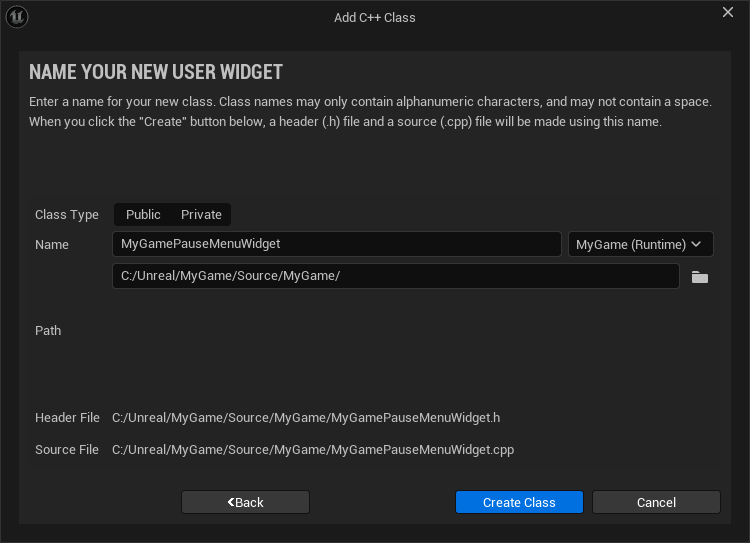
2. Açılan pencerede "Name" satırına "MyGamePauseMenuWidget" değerini girdikten sonra "Create Class" butonuna tıklayarak Widget sınıfını oluşturalım.
3. Dosyaların içerikleri aşağıdaki şekilde olacaktır:
// MyGamePauseMenuWidget.h

#include "CoreMinimal.h"
#include "Blueprint/UserWidget.h"
#include "MyGamePauseMenuWidget.generated.h"

/**
 *
 */
UCLASS()
class MYGAME_API UMyGamePauseMenuWidget : public UUserWidget
{
	GENERATED_BODY()
};
// MyGamePauseMenuWidget.cpp

#include "MyGamePauseMenuWidget.h"
4. Kodlar derlendikten sonra "C++ Classes/MyGame" dizini altında "MyGamePauseMenuWidget" adlı bir dosya otomatik olarak oluşturulacaktır.
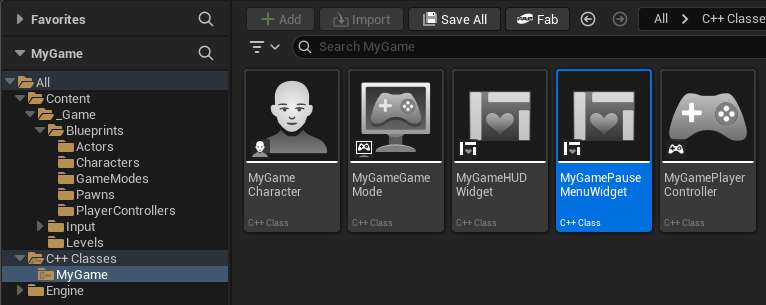
Widget sınıfı kod dosyalarının içeriğini aşağıdaki şekilde düzenleyelim:
// MyGamePauseMenuWidget.h

#pragma once

#include "CoreMinimal.h"
#include "Blueprint/UserWidget.h"
#include "MyGamePauseMenuWidget.generated.h"

DECLARE_DYNAMIC_MULTICAST_DELEGATE(FOnResumeClicked);
DECLARE_DYNAMIC_MULTICAST_DELEGATE(FOnRestartClicked);
DECLARE_DYNAMIC_MULTICAST_DELEGATE(FOnQuitClicked);

/**
 * Pause Menu Widget - C++ implementasyonu
 */
UCLASS()
class MYGAME_API UMyGamePauseMenuWidget : public UUserWidget
{
    GENERATED_BODY()

public:
    //////////////////////////////////////////////////////////////////////////
    // Constructor ve Yaşam Döngüsü

    UMyGamePauseMenuWidget(const FObjectInitializer& ObjectInitializer);

    virtual void NativeConstruct() override;
    virtual void NativeDestruct() override;

    //////////////////////////////////////////////////////////////////////////
    // Widget Fonksiyonları

    /**
     * Pause menüsünü göster
     */
    UFUNCTION(BlueprintCallable, Category = "MyGame|PauseMenu")
    void ShowMenu();

    /**
     * Pause menüsünü gizle
     */
    UFUNCTION(BlueprintCallable, Category = "MyGame|PauseMenu")
    void HideMenu();

    /**
     * Menü görünürlüğünü değiştir
     */
    UFUNCTION(BlueprintCallable, Category = "MyGame|PauseMenu")
    void ToggleMenu();

    //////////////////////////////////////////////////////////////////////////
    // Delegates (Event'ler)

    /**
     * Resume butonuna tıklandığında
     */
    UPROPERTY(BlueprintAssignable, Category = "MyGame|PauseMenu")
    FOnResumeClicked OnResumeClicked;

    /**
     * Restart butonuna tıklandığında
     */
    UPROPERTY(BlueprintAssignable, Category = "MyGame|PauseMenu")
    FOnRestartClicked OnRestartClicked;

    /**
     * Quit butonuna tıklandığında
     */
    UPROPERTY(BlueprintAssignable, Category = "MyGame|PauseMenu")
    FOnQuitClicked OnQuitClicked;

    //////////////////////////////////////////////////////////////////////////
    // Blueprint Implementable Events

    /**
     * Menü gösterildiğinde
     */
    UFUNCTION(BlueprintImplementableEvent, Category = "MyGame|PauseMenu")
    void OnMenuShown();

    /**
     * Menü gizlendiğinde
     */
    UFUNCTION(BlueprintImplementableEvent, Category = "MyGame|PauseMenu")
    void OnMenuHidden();

protected:
    //////////////////////////////////////////////////////////////////////////
    // Widget Component Referansları

    /**
     * Resume butonu
     */
    UPROPERTY(meta = (BindWidget))
    class UButton* ButtonResume = nullptr;

    /**
     * Restart butonu
     */
    UPROPERTY(meta = (BindWidget))
    class UButton* ButtonRestart = nullptr;

    /**
     * Quit butonu
     */
    UPROPERTY(meta = (BindWidget))
    class UButton* ButtonQuit = nullptr;

    /**
     * Menü görünür mü?
     */
    bool bIsMenuVisible = false;

private:
    //////////////////////////////////////////////////////////////////////////
    // Buton Event Handler'ları

    /**
     * Resume butonuna tıklandığında
     */
    UFUNCTION()
    void OnResumeButtonClicked();

    /**
     * Restart butonuna tıklandığında
     */
    UFUNCTION()
    void OnRestartButtonClicked();

    /**
     * Quit butonuna tıklandığında
     */
    UFUNCTION()
    void OnQuitButtonClicked();
};
// MyGamePauseMenuWidget.cpp

#include "MyGamePauseMenuWidget.h"
#include "Components/Button.h"
#include "Kismet/GameplayStatics.h"
#include "Engine/World.h"

// Log category
DEFINE_LOG_CATEGORY_STATIC(LogMyGamePauseMenu, Log, All);

UMyGamePauseMenuWidget::UMyGamePauseMenuWidget(const FObjectInitializer& ObjectInitializer)
    : Super(ObjectInitializer)
{
    UE_LOG(LogMyGamePauseMenu, Log, TEXT("MyGamePauseMenuWidget constructor"));
}

void UMyGamePauseMenuWidget::NativeConstruct()
{
    Super::NativeConstruct();

    UE_LOG(LogMyGamePauseMenu, Log, TEXT("Pause Menu Widget NativeConstruct"));

    // Butonları bağla
    if (ButtonResume)
    {
        ButtonResume->OnClicked.AddDynamic(this, &UMyGamePauseMenuWidget::OnResumeButtonClicked);
        UE_LOG(LogMyGamePauseMenu, Log, TEXT("Resume button bound"));
    }
    else
    {
        UE_LOG(LogMyGamePauseMenu, Warning, TEXT("ButtonResume is not bound!"));
    }

    if (ButtonRestart)
    {
        ButtonRestart->OnClicked.AddDynamic(this, &UMyGamePauseMenuWidget::OnRestartButtonClicked);
        UE_LOG(LogMyGamePauseMenu, Log, TEXT("Restart button bound"));
    }
    else
    {
        UE_LOG(LogMyGamePauseMenu, Warning, TEXT("ButtonRestart is not bound!"));
    }

    if (ButtonQuit)
    {
        ButtonQuit->OnClicked.AddDynamic(this, &UMyGamePauseMenuWidget::OnQuitButtonClicked);
        UE_LOG(LogMyGamePauseMenu, Log, TEXT("Quit button bound"));
    }
    else
    {
        UE_LOG(LogMyGamePauseMenu, Warning, TEXT("ButtonQuit is not bound!"));
    }

    // Başlangıçta menüyü gizle
    HideMenu();
}

void UMyGamePauseMenuWidget::NativeDestruct()
{
    UE_LOG(LogMyGamePauseMenu, Log, TEXT("Pause Menu Widget NativeDestruct"));

    // Buton bağlantılarını temizle
    if (ButtonResume)
    {
        ButtonResume->OnClicked.RemoveAll(this);
    }

    if (ButtonRestart)
    {
        ButtonRestart->OnClicked.RemoveAll(this);
    }

    if (ButtonQuit)
    {
        ButtonQuit->OnClicked.RemoveAll(this);
    }

    Super::NativeDestruct();
}

void UMyGamePauseMenuWidget::ShowMenu()
{
    if (bIsMenuVisible)
        return;

    SetVisibility(ESlateVisibility::Visible);
    bIsMenuVisible = true;

    // Focus ilk butona ver
    if (ButtonResume)
    {
        ButtonResume->SetFocus();
    }

    UE_LOG(LogMyGamePauseMenu, Log, TEXT("Pause menu shown"));

    // Blueprint event
    OnMenuShown();
}

void UMyGamePauseMenuWidget::HideMenu()
{
    if (!bIsMenuVisible)
        return;

    SetVisibility(ESlateVisibility::Hidden);
    bIsMenuVisible = false;

    UE_LOG(LogMyGamePauseMenu, Log, TEXT("Pause menu hidden"));

    // Blueprint event
    OnMenuHidden();
}

void UMyGamePauseMenuWidget::ToggleMenu()
{
    if (bIsMenuVisible)
    {
        HideMenu();
    }
    else
    {
        ShowMenu();
    }
}

void UMyGamePauseMenuWidget::OnResumeButtonClicked()
{
    UE_LOG(LogMyGamePauseMenu, Log, TEXT("Resume button clicked"));

    // Delegate'i tetikle
    OnResumeClicked.Broadcast();

    // Menüyü gizle
    HideMenu();
}

void UMyGamePauseMenuWidget::OnRestartButtonClicked()
{
    UE_LOG(LogMyGamePauseMenu, Log, TEXT("Restart button clicked"));

    // Delegate'i tetikle
    OnRestartClicked.Broadcast();

    // Oyunu yeniden başlat
    if (UWorld* World = GetWorld())
    {
        FString CurrentLevelName = World->GetMapName();
        CurrentLevelName.RemoveFromStart(World->StreamingLevelsPrefix);
        UGameplayStatics::OpenLevel(this, FName(*CurrentLevelName));
    }
}

void UMyGamePauseMenuWidget::OnQuitButtonClicked()
{
    UE_LOG(LogMyGamePauseMenu, Log, TEXT("Quit button clicked"));

    // Delegate'i tetikle
    OnQuitClicked.Broadcast();

    // Oyunu kapat (Editor'da çalışıyorsa PIE'yi durdur)
    if (APlayerController* PC = GetOwningPlayer())
    {
        UKismetSystemLibrary::QuitGame(
            GetWorld(),
            PC,
            EQuitPreference::Quit,
            false
        );
    }
}
"Content/_Game/Blueprints" dizini altında "Widgets" adlı bir dizin oluşturalım.
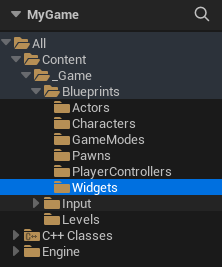
HUD Widget Blueprint sınıfı
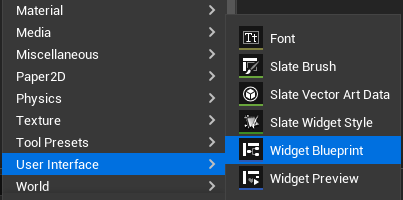
1. "Content/_Game/Blueprints/Widgets" dizini içinde iken, sağ tıkladığımızda açılan menüden, "User Interface -> Widget Blueprint" seçeneğine tıklayalım.
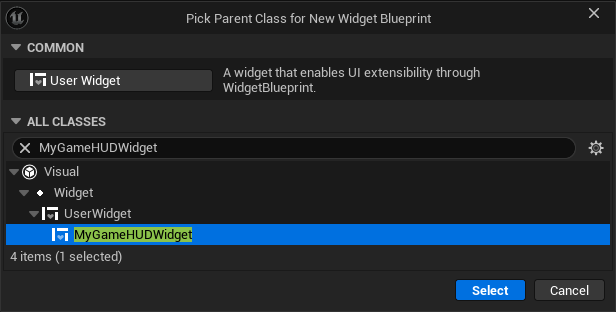
2. Açılan pencerede, "MyGameHUDWidget" seçeneğini seçtikten sonra "Select" butonuna tıklayarak HUD Widget Blueprint sınıfını oluşturalım.
3. İşlem sonucunda "Content\_Game\Blueprints\Widgets" dizininde oluşturulan Widget Blueprint sınıfının adını "WBP_HUD" olarak değiştirelim.
Pause menü Blueprint sınıfı
1. "Content/_Game/Blueprints/Widgets" dizini içinde iken, sağ tıkladığımızda açılan menüden, "User Interface -> Widget Blueprint" seçeneğine tıklayalım.
2. Açılan pencerede, "MyGamePauseMenuWidget" seçeneğini seçtikten sonra "Select" butonuna tıklayarak Pause Menu Widget Blueprint sınıfını oluşturalım.
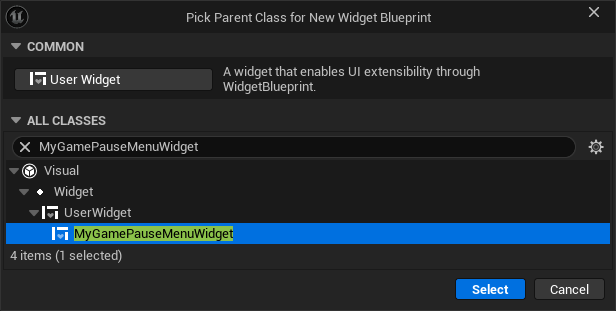
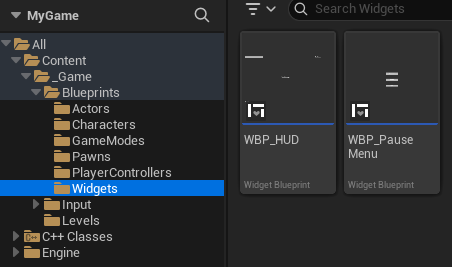
3. İşlem sonucunda "Content\_Game\Blueprints\Widgets" dizininde oluşturulan Widget Blueprint sınıfının adını "WBP_PauseMenu" olarak değiştirelim.
Sonuçta, "Content/_Game/Blueprints/Widgets" dizini içinde iki adet Widget Blueprint oluşturulur.
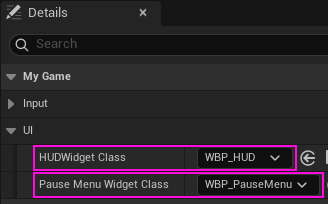
"BP_MyGamePlayerController" penceresinde "Details" sekmesinde "UI" satırı altında yer alan aşağıdaki değerleri karşılarında gösterilen sınıfları atayalım:
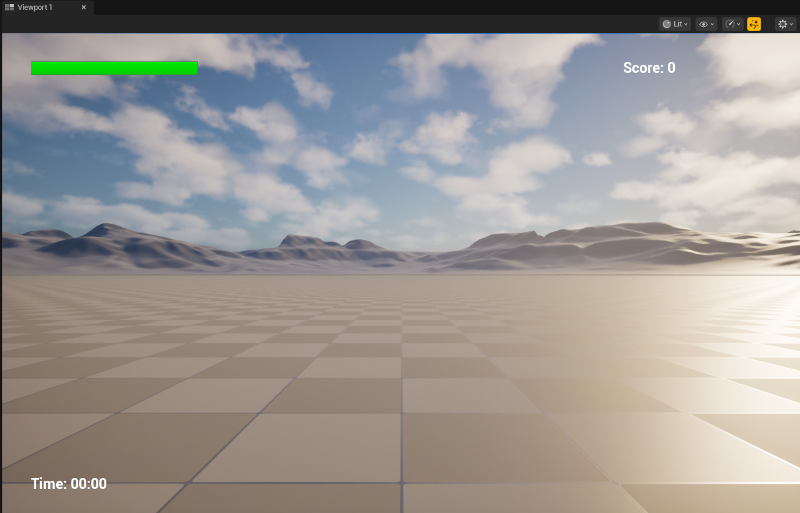
Projeyi çalıştırdığımızda,
1. Aşağıdakine benzer bir ekran karşımıza gelir:
2. Aşağıdaki ifadeler sahne ekranında görünür ve bir süre sonra kaybolur.
Welcome .... to My Game!
GAME STARTED
3. Aşağıdaki ifadeler Output Log ekranına yazılır:
LogLoad: Game class is 'BP_MyGameGameMode_C'
LogMyGame: MyGameGameMode initialized
LogMyGamePlayerController: MyGamePlayerController initialized
LogMyGamePlayerController: Setting up input component
LogMyGamePlayerController: Enhanced Input Component found
LogMyGamePlayerController: Enhanced Input subsystem found in SetupInputComponent
LogMyGamePlayerController: Default Input Mapping Context added
LogMyGamePlayerController: Move input action bound
LogMyGamePlayerController: Look input action bound
LogMyGamePlayerController: Jump input action bound
LogMyGamePlayerController: Sprint input action bound
LogMyGamePlayerController: Interact input action bound
LogMyGamePlayerController: Pause input action bound
LogMyGameCharacter: MyGameCharacter initialized
LogMyGame: Pawn spawned for player: BP_MyGameCharacter_C_0
LogMyGameCharacter: Character SetupPlayerInputComponent
LogMyGamePlayerController: PlayerController possessing pawn: BP_MyGameCharacter_C_0
LogMyGame: Handling new player: BP_MyGamePlayerController_C_0
LogMyGame: Player ... joined the game. Total players: 1
LogMyGame: GameMode BeginPlay - Current State: Waiting
LogMyGamePlayerController: PlayerController BeginPlay
LogMyGamePlayerController: Enhanced Input subsystem found
LogMyGameHUD: MyGameHUDWidget constructor
LogMyGameHUD: HUD Widget NativeConstruct
LogMyGamePlayerController: HUD created and added to viewport
LogMyGamePlayerController: Default Input Mapping Context added
LogMyGameCharacter: Character BeginPlay: Health = 100.0/100.0
LogMyGame: Game State Changed: Waiting -> Playing
LogMyGame: Game Started! Duration: 300 seconds
LogMyGamePlayerController: PlayerController unpossessing pawn
LogMyGame: Player ... left the game
LogMyGame: Game State Changed: Playing -> Finished
LogMyGame: Game Ended: Player Lost
LogMyGameHUD: HUD Widget NativeDestruct